Free trial and limits
OpsPilot starts a 15-day free trial the first time it runs. Here is what the trial includes, the three limits that apply during it and after it, what each badge in the side list means, and what changes when you subscribe.
| Free trial | Without a subscription | Subscription | |
|---|---|---|---|
| Sessions open at once | Up to 10 | Up to 10 | No limit |
| Saved connections you can open | Your first 10 (all are kept) | Your first 10 (all are kept) | All |
| AI | On 2 of your connections at a time, which you choose | Off | On every connection where you turn it on |
| AI Assistants and remote operation through the ChatGPT tunnel | Yes | No | Yes |
| Terminal, files, transfers, remote desktop, every connection type | Yes | Yes | Yes |
The free trial
The trial starts on first launch. There is no account to create, no email, no card and no activation. For 15 days you have the complete product, with the three limits in the table above.
- The clock must be right. If the computer's date and time are wrong at first launch, the trial waits until they are corrected, so you still get all 15 days.
- Reinstalling does not restart it. OpsPilot keeps the trial start in a few small files in your user profile, which uninstalling leaves in place.
- It needs a user profile OpsPilot can write to. On a locked-down desktop where OpsPilot cannot save anything, no trial starts, because its end could never be kept. The terminal still works, with up to 10 sessions open at once. For an evaluation on such machines, ask NubeStack for an evaluation license at support@nubestack.com.
While the trial runs, the titlebar shows a chip such as Trial · 12 days left; it opens Settings → License. In the last three days a banner below the tabs says when the trial ends, with Subscribe and Dismiss.
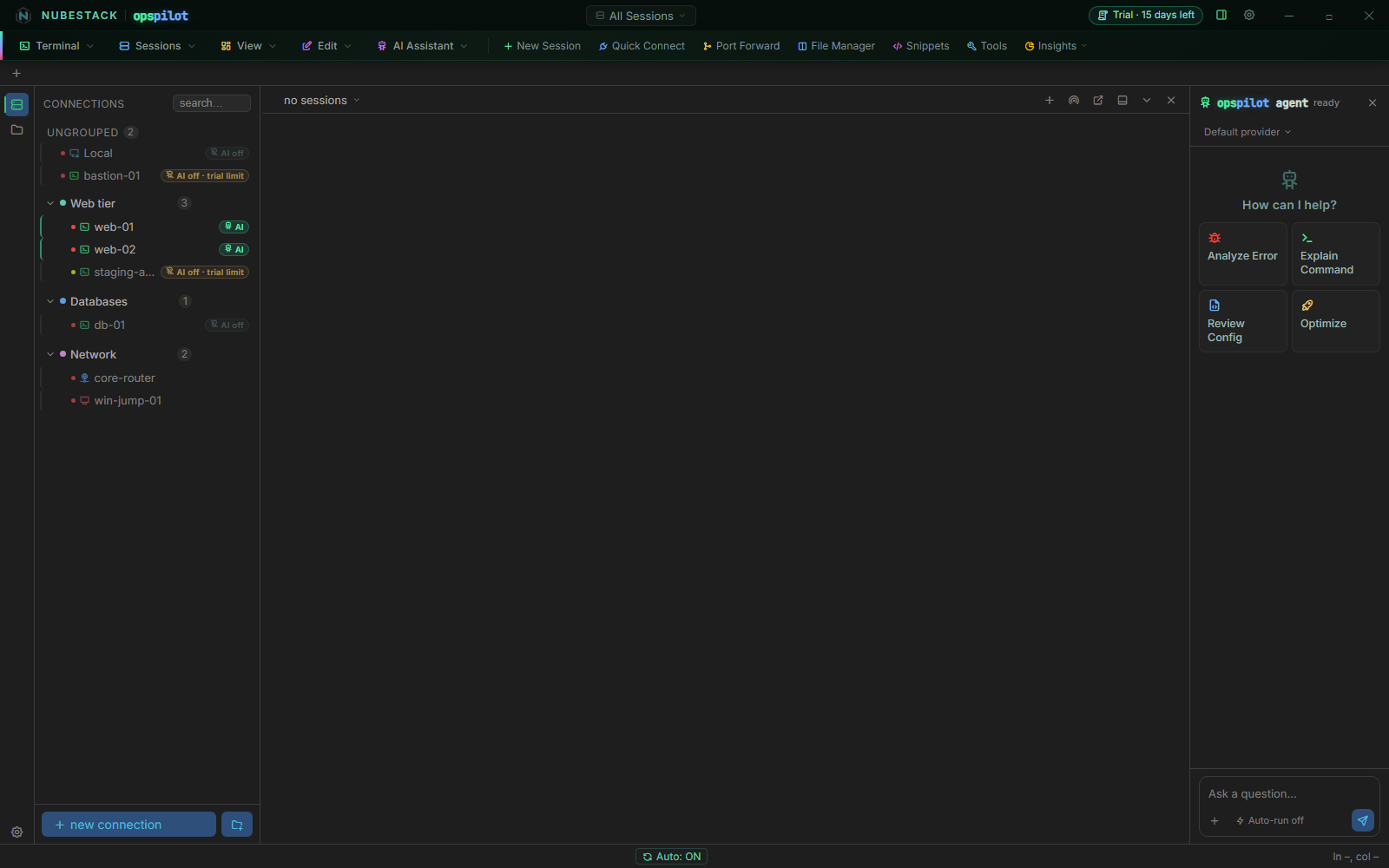 The trial chip sits at the top right. In the side list, web-01 and web-02 hold
the trial's two AI places, bastion-01 and staging-app show AI off · trial
limit, and Local and db-01 show AI off because AI is turned off for them.
Settings → License shows Free trial · 12 days left, one line with the limits and the date the trial ends, and What this means right now, which lists what applies on this computer and how many sessions are open.
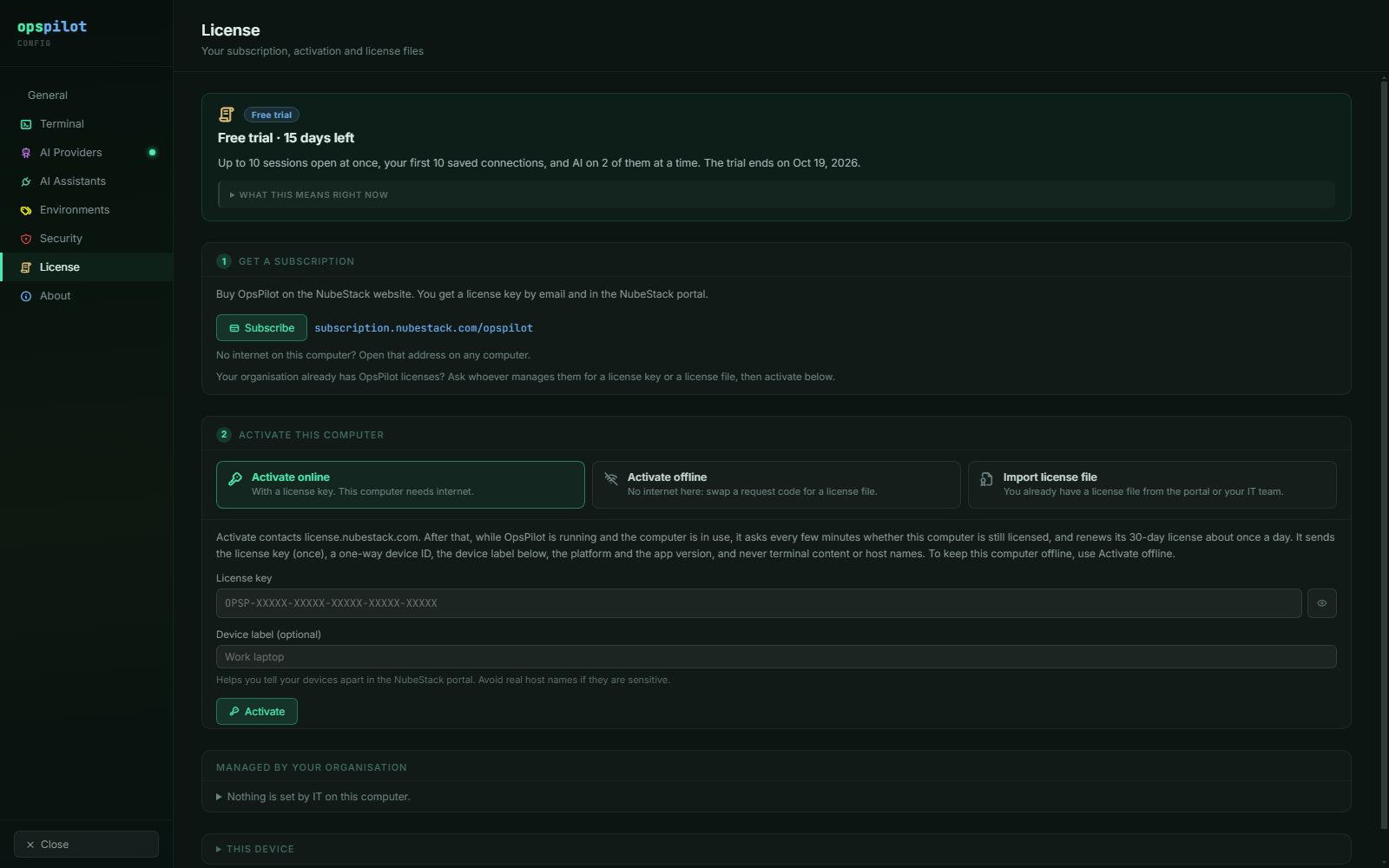 In the trial the page leads with the limits and the end date, then 1 Get a
subscription with Subscribe and the address to open on another computer, then
2 Activate this computer for when you have a license key or file.
AI on 2 connections in the trial
During the trial, AI can be on for 2 of your saved connections at a time, and you choose which. Every AI capability is available for those two: diagnosis, proposals, the approval gate, redaction, AI Providers and AI Assistants.
The first two. When the trial starts, the two places go to your two oldest saved connections that have AI turned on. Local gets one only if you turned AI on for it, because it starts with AI off. On a new install, they go to the first two connections you save with AI on.
Every other connection with AI turned on shows AI off · trial limit in the side list, whether it is open or not. A tab of it opens with AI off: the terminal and the AI panel say "AI off · free trial: AI on 2 connections at a time", the AI panel names the two connections that have AI and offers Use AI here… and Subscribe, and the tab shows an AI-off mark.
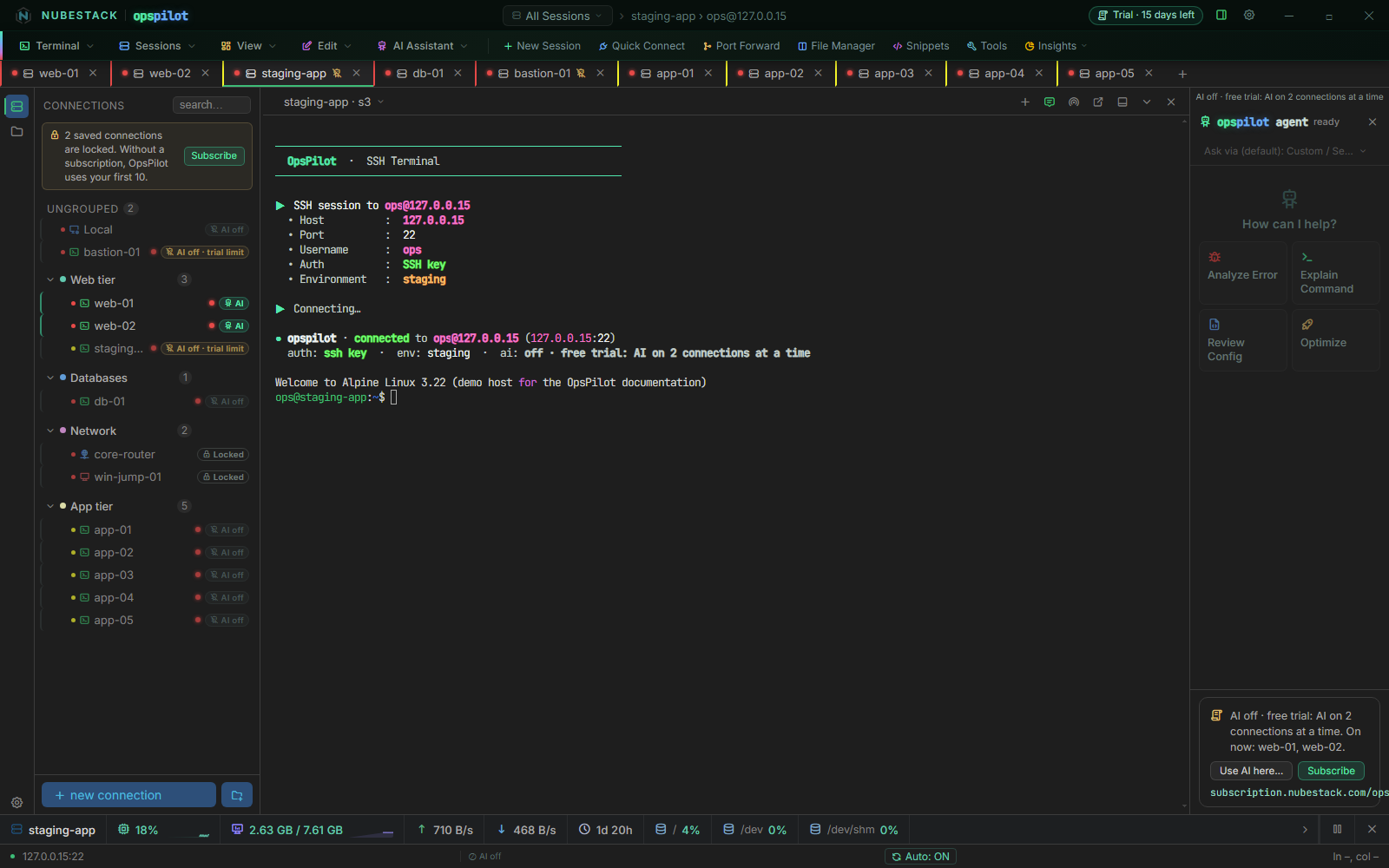 A third connection with AI turned on opens with AI off. The AI panel lists the
connections that have AI ("On now: web-01, web-02"); Use AI here… moves AI to this
connection.
Moving AI to another connection
- Click the connection's AI off · trial limit badge, or turn AI on in one of its tabs. You can also right-click the connection and choose Turn AI on.
- If one of the two places is free, the connection takes it at once.
-
If both are taken, a dialog names the two connections that have AI, for example "Free trial: AI can be on for 2 connections at a time. It is on for web-01 and web-02." Choose Use AI on bastion-01 instead of web-01 or Use AI on bastion-01 instead of web-02. AI moves in one step and is never on for more than 2 connections.
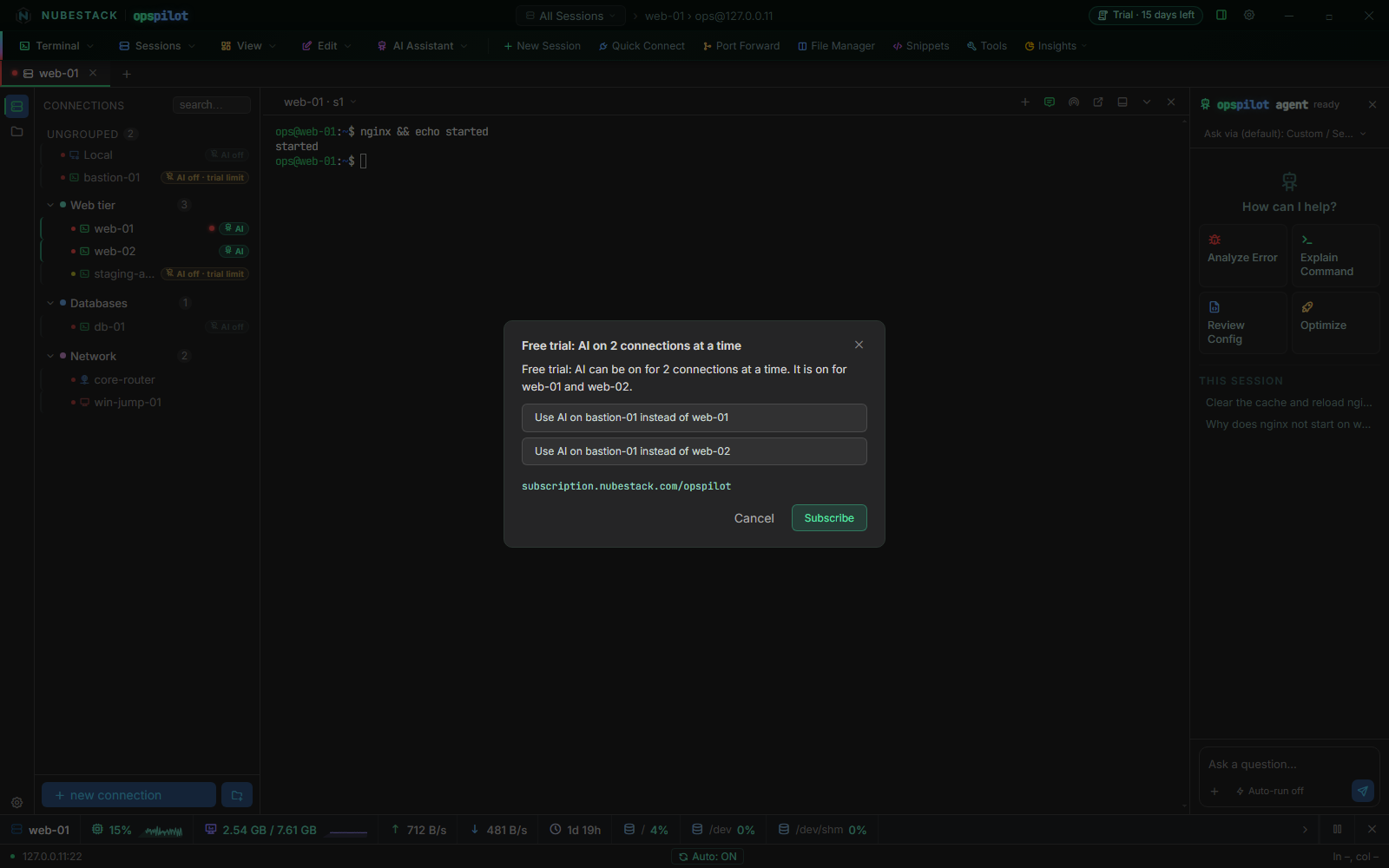 Each button moves AI in one step. Cancel changes nothing, but OpsPilot remembers
that you want AI on bastion-01, so it gets AI when you subscribe.
Choosing a connection this way turns AI on for it, so it keeps its place when its tabs close and when you restart OpsPilot.
The connection you take AI from keeps its own AI setting. It shows AI off · trial limit and gets AI back by itself when you subscribe. If you choose Cancel, OpsPilot remembers in the same way that you want AI on that connection.
When two saved connections have the same name, the dialog tells them apart by host or group, for example db (10.5.0.2).
Freeing a place
Turn AI off for one of the two connections (with its badge, its menu or the AI switch in its tab), or delete it. Nothing takes the free place by itself, not even a connection you add or duplicate afterwards: choose where AI goes next. A connection that becomes locked (see Your first 10 saved connections) frees its place too.
Moving a connection to another group never changes its AI setting or its place. The places are kept when you restart OpsPilot.
Tabs and unsaved connections
- AI is on in at most 2 tabs. If you open the same connection twice, both tabs can have AI. A tab of your other connection then opens with "AI off · free trial: AI in 2 tabs at a time", and its badge says AI off · tab limit. Turning AI on there offers Use AI here instead of Local (tab 2) and similar buttons, which move AI from that tab.
- A connection opened without saving it (with Save connection turned off in the connection dialog) takes a free place when it connects and gives it back when you close its tab. If no place was free, it waits with AI off and does not take a place that frees up later; turn AI on in it to use AI there.
- A saved connection deleted while a tab of it is open leaves that tab open, as a tab of no saved connection. Turning AI on in it takes a free place for that tab only.
- A disconnected tab keeps its AI while its connection holds the place, so you can still ask about its last output. It says what will keep AI off when it reconnects, and how to reconnect: "Not connected: press Enter in the terminal to reconnect" (Ctrl+R in a Local Console tab).
AI Assistants in the trial
A connected AI Assistant can open only connections that hold one of the two places, and not while AI is already on in 2 tabs of other connections. It is told why, and the choice stays yours in OpsPilot.
Up to 10 sessions open at once
In the trial and without a subscription, up to 10 sessions can be open at once, with or without AI: for example, two sessions with AI alongside eight ordinary terminals.
What counts as a session:
- every tab: SSH, Telnet, RSH and serial terminals, local shells, file browser tabs, remote desktops and hypervisor consoles
- a program OpsPilot starts in its own window, while it runs: Mosh, a VNC viewer, and
remote desktop on macOS and Linux. It shows in the tab bar with a Close button.
When OpsPilot hands the program to another app it cannot follow (for example remote
desktop and Mosh on macOS, or a VNC viewer opened through a
vnc://link), it counts until you close its entry in the tab bar; that does not close the program's window.
A detached window is the same session as its tab, and saved connections that are not open never count.
Opening an 11th session shows the Session limit reached dialog. It says how many sessions are open and what to close, with Close, License settings and, in the trial or without a subscription, Subscribe. No tab is opened.
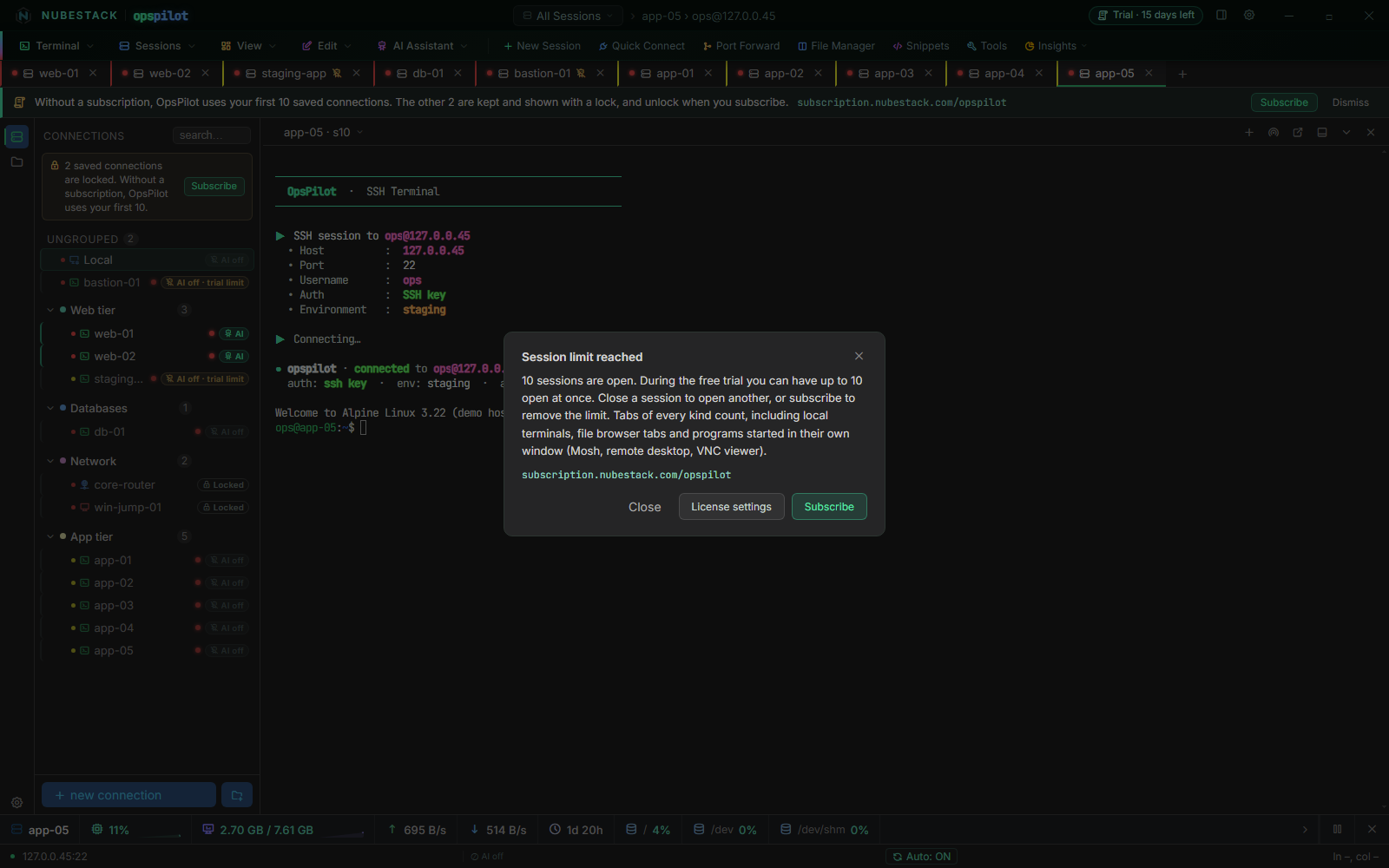 With ten tabs open, the eleventh is refused. The dialog says which kinds of session
count; the tabs already open are not touched.
A tab that tries to reconnect while 10 sessions are open says, for example, "Session limit reached: 10 of 10 open. Close a session, then press Enter." (Ctrl+R in tabs that do not reconnect on Enter).
Your first 10 saved connections
In the trial and without a subscription, OpsPilot opens only your first 10 saved connections: the 10 you created first.
- The order is fixed by creation time. Dragging a connection in the list, editing it or moving it to another group does not change which ones they are. A new or duplicated connection is always the newest.
- The others are locked, not lost. They stay in the list, greyed out with a lock and a Locked badge, and a note above the list says how many are locked. They cannot be opened, edited, duplicated or moved, and an AI Assistant cannot open them. They stay in OpsPilot's data folder, so a backup of that folder includes them. When connections first become locked, a notice below the tabs says so once, with Subscribe and Dismiss.
- You can delete any connection. Deleting one of the first 10 unlocks the next.
- Local always works. The built-in Local connection is not one of the 10 while it opens a local shell. Changed into another kind of connection, it counts like any other.
- Unsaved connections work. A connection opened without saving it opens within the 10 sessions.
- Saving an 11th connection keeps it, locked. OpsPilot says "Saved and locked: without a subscription, OpsPilot uses your first 10 saved connections."
- Open sessions stay open. A session whose connection becomes locked stays open and counts toward the 10. Once it is closed, or its connection drops, it opens again after you subscribe.
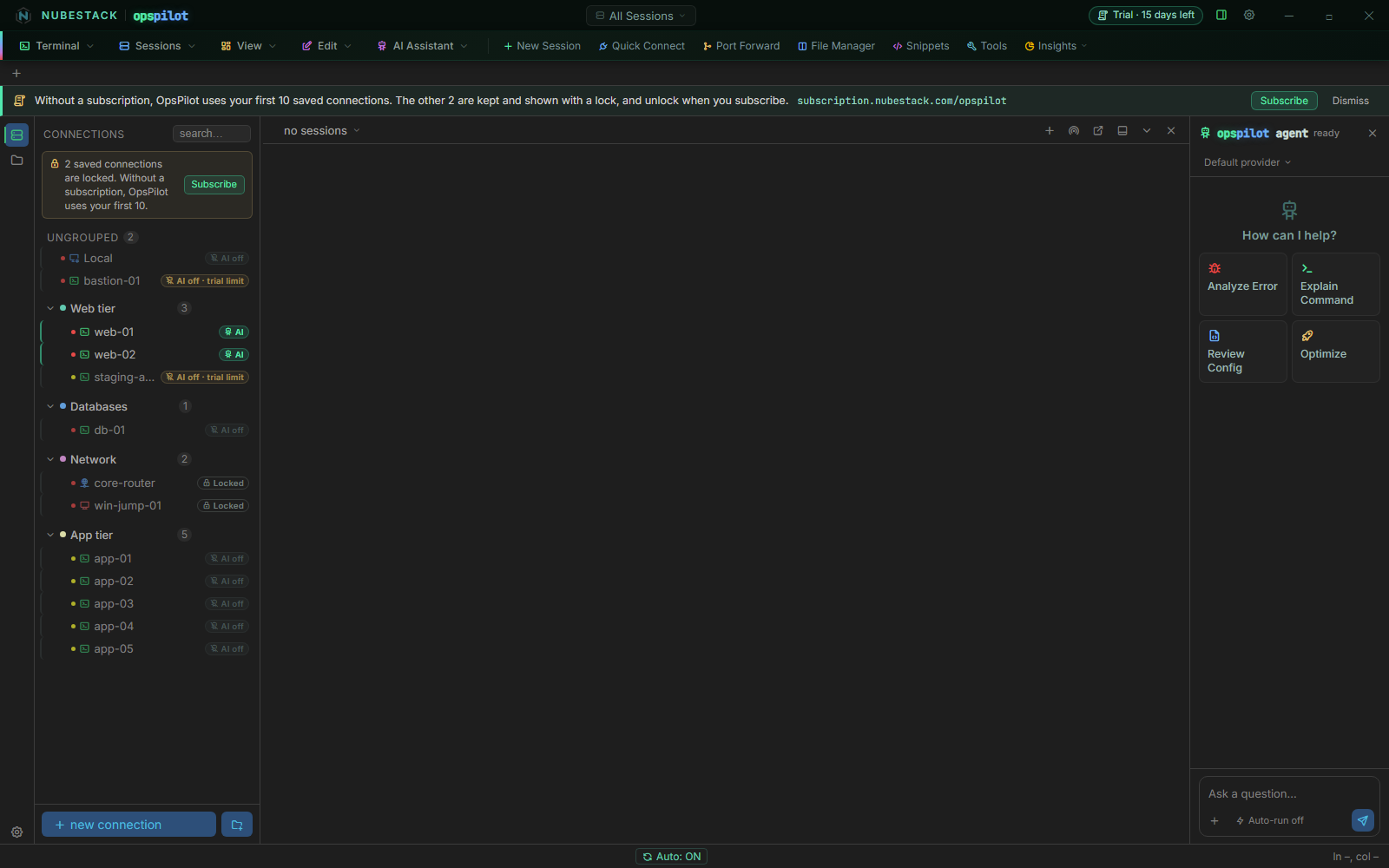 With 13 saved connections, the two created last (core-router and win-jump-01)
are locked. The notice below the tabs appears once; the note above the side list stays
while connections are locked.
Opening a locked connection shows Saved connection locked, which says why and, in the trial and without a subscription, offers Subscribe.
After the trial
When the 15 days are up, OpsPilot keeps working and nothing is deleted.
- The terminal keeps working, with up to 10 sessions open at once from your first 10 saved connections. Every connection type, the file explorer and editor, transfers, port forwarding, remote desktop and hypervisor consoles work as before.
- AI is off in every session. AI Providers, AI Assistants, command proposals and remote operation through the ChatGPT tunnel are unavailable until you subscribe.
- Your configuration is kept: saved connections, providers, Command Safety and Data Handling profiles, the tunnel settings and every other setting.
OpsPilot says once that the trial has ended, with Subscribe and Dismiss. After that, the titlebar chip reads No subscription · AI off.
If you turn AI on in a session while your license does not allow it, OpsPilot says why and remembers that you want AI there. The session gets AI by itself once the license allows it.
A paid license that lapses or has a problem
The table shows what applies when a paid license stops working. In each case OpsPilot says why, and never asks a paying customer to subscribe.
| Situation | Titlebar chip | Sessions | Saved connections | AI |
|---|---|---|---|---|
| The subscription ended (after its grace period) | Subscription ended · AI off | Up to 10 | First 10 | Off |
| A license file, or your organisation's license, expired | License expired · AI off | Up to 10 | First 10 | Off |
| The computer's clock needs fixing | Clock problem · AI paused | Up to 10 | All | Paused |
| OpsPilot is checking this computer's identity | License check paused · AI paused | Up to 10 | All | Paused |
| The license is suspended | License suspended · AI off | Up to 10 | All | Off |
| Your organisation released this computer | Not activated · AI off | Up to 10 | All | Off |
| Licensing could not start | License check failed | No limit | All | Off |
- Renewal due. After the paid period ends there is a grace period with every feature still working: 7 days for an online activation, 14 days for a license file. OpsPilot shows Renewal due and how many days are left.
- Paused means AI comes back by itself once the problem is fixed. See Clock problems and Device identity.
- Licensing could not start. OpsPilot runs with no session limit and nothing locked, and AI stays off. Settings → License shows Licensing could not start with Try again.
- A released computer says who released it; see Released computers.
Side-list badges
Next to every saved connection, open or not, the side list says what applies to it. Point at a badge to read the full reason.
| Badge | Meaning | Clicking it |
|---|---|---|
| AI | AI is on for this connection (with a subscription, every connection where you turned it on; in the trial, the 2 you chose) | Turns AI off |
| AI off | You turned AI off for this connection | Turns AI on |
| AI off · trial limit | In the trial, AI is on for 2 other connections | Chooses this one, with the dialog if both places are taken |
| AI off · tab limit | In the trial, AI is already on in 2 other tabs | Offers to move AI from one of them |
| AI off · no subscription | The trial ended and there is no license | Nothing |
| AI off · subscription ended | The subscription for this license is not active | Nothing |
| AI off · license expired | A license file or your organisation's license ran out, or an online license ran out while this computer could not reach the license server | Nothing |
| AI paused | The clock needs fixing, OpsPilot is checking this computer's identity, or it has just started and is still reading its license | Nothing |
| AI off · licensing problem | Anything else, such as a suspended license or a computer your organisation released | Nothing |
| Locked | One of your saved connections beyond the first 10, in the trial or without a subscription | Nothing |
The badges that only say why licensing keeps AI off are not controls: the keyboard skips them and a connection's menu does not offer them. Serial connections, which never have AI, show no AI badge.
What licensing never does
- It never closes a session. Losing a license, a connection becoming locked or the trial ending leaves every open session open.
- It never cuts off an AI answer. An answer already being written when AI turns off finishes. New AI requests are refused, and a command it proposes arrives expired, so nothing runs by itself.
- It never deletes your configuration.
- It never blocks the terminal. If licensing cannot start at all, OpsPilot runs with no session limit and AI off.
After you subscribe
Activating a subscription removes every limit at once: the 10 sessions, the lock on your saved connections and the trial's 2 AI places.
AI comes back by itself in every open session that wants it, except where you turned it off yourself, or where the connection is saved with AI off and you did not turn AI on in that session. That includes a connection you moved AI away from during the trial, and one where turning AI on was refused or you cancelled the dialog. OpsPilot confirms with "AI is on again in your open sessions, except where you turned it off."
The same happens when a lapsed subscription is renewed or a renewed license file is imported. A deployment license or an evaluation license lifts every limit too.
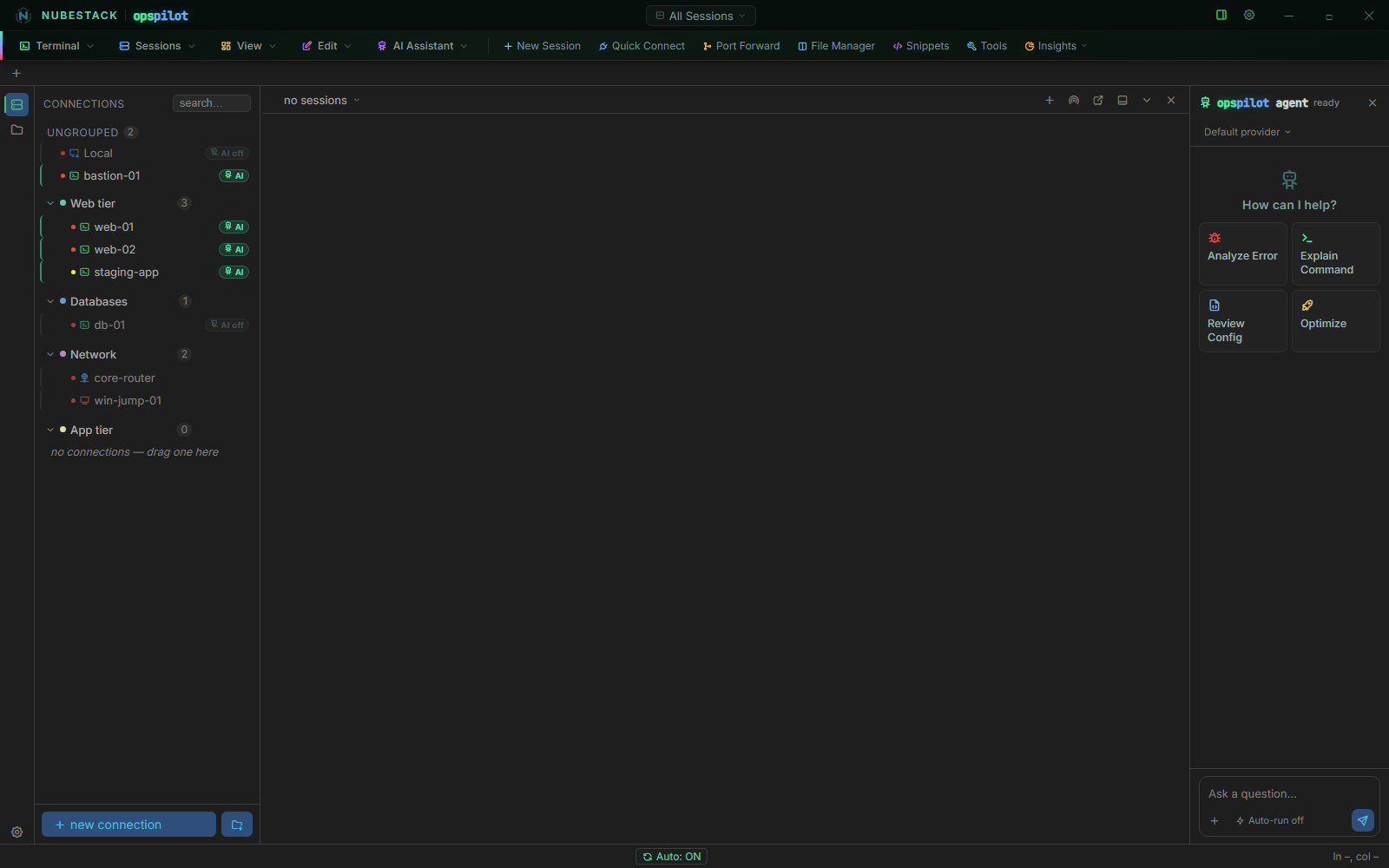 After activation the trial chip is gone. Every connection with AI turned on shows
AI, including bastion-01 and staging-app, which waited during the trial;
db-01 keeps AI off because AI is turned off for it.
See also
- Subscribe: buy a subscription and give each person a license key
- Activate OpsPilot: online, offline or with a deployment license
- Plans & subscription: the plans side by side, and prices
- Groups & environments: the side list and its keyboard use