Execution boundary and risk tiers
This page describes the boundary the product is built on, and the three tiers a proposed command can land in. Read it before you enable AI on a connection that matters; everything else in this section refines what is here.
The execution boundary
The AI model has no execution capability inside OpsPilot. It has one output channel: a proposal. Turning a proposal into a real command requires an explicit approval event raised by your click. OpsPilot's own code is what runs anything against a session.
There is no configuration, provider, assistant or prompt that changes this. It is not a
toggle, and the product does not present it as one: Settings → Security → Command
Safety lists AI direct execution with the badge Always enforced rather than a
switch. A model that decides to run rm -rf / produces a card on your screen, not an
outage.
What varies between the tiers is which decision you have to make, never whether one is required.
This applies to assistants too
A proposal that arrives from Claude Desktop, VS Code or ChatGPT over the MCP connector goes through the same approval gate, in the same window, with the same tiers. There is no separate, looser path for an external assistant. See AI Assistants.
The three tiers
Every proposed command lands in exactly one tier, and the tier determines what it takes to run.
| Tier | Where the tier comes from | What it takes to run |
|---|---|---|
| Read-only | The model marked the command safe | One click — or none, if you switched auto-run on |
| Low risk | Neither flag set | One explicit click, always |
| High risk | The model marked it dangerous or it matched one of your dangerous patterns | A typed written justification, then the click |
Read-only means viewing: reading logs, describing or listing resources, checking status. Nothing that changes or deletes ever carries this tag — and if a model tags something that does, your pattern list is what catches it.
A High risk command needs a real typed reason by default. That requirement is per profile and can be turned off, in which case the command still needs an explicit click; the click itself can never be turned off. See Approvals & auto-run.
The asymmetry
Classification comes from two independent sources:
- The model's own self-assessment. The model is asked to classify each command it proposes as safe, dangerous, or neither.
- Your dangerous-pattern list, resolved from the Command Safety profile that applies to the session — plain-text, case-insensitive substrings.
They are combined with a deliberate asymmetry: a pattern match can promote a command to High risk, but nothing can demote a command the model already flagged. Classification moves in one direction only.
- A model that misjudges a destructive command is still caught by your list. This also covers the case where the terminal output itself is hostile — output containing injected instructions cannot talk a command down into the auto-run tier, because the pattern list is applied afterwards and independently.
- A model that is over-cautious is never silently overridden. If the model says dangerous and your list says nothing, the command is still High risk. You can approve it; you cannot configure the flag away.
When a command reaches the justification gate, OpsPilot says which of the two sources flagged it — either "Flagged dangerous by the AI", or the specific pattern it matched and the profile that pattern came from.
One investigation, three tiers
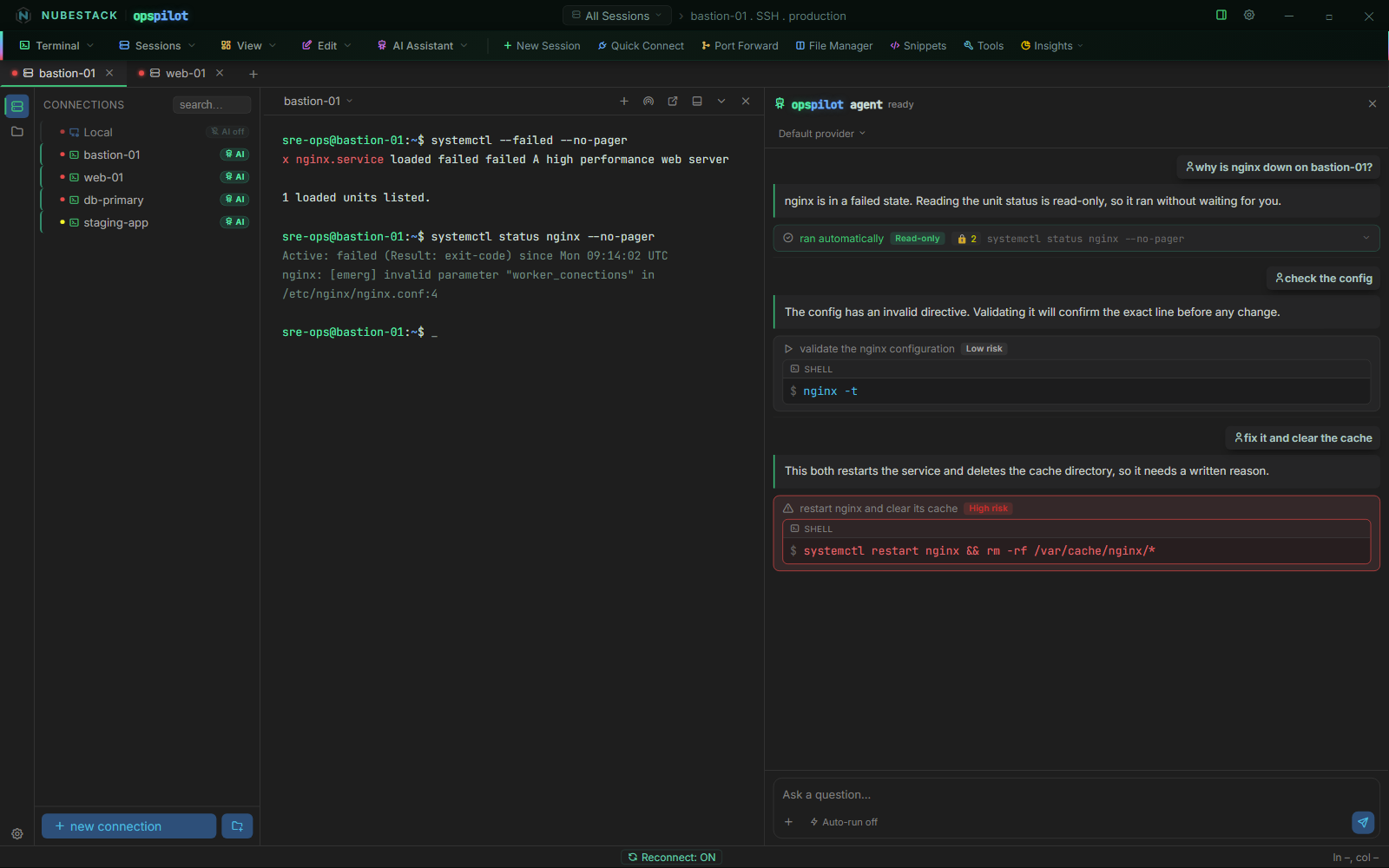
One investigation producing all three tiers. The read-only status check ran on its own
and carries a 🔒 2 badge — two secrets were scrubbed from its output before the AI saw
it. The config test waits for a click. The restart-and-delete command matched the
rm -rf pattern, so it is High risk and needs a written reason before it can run.
The panel, read top to bottom:
- The status check was tagged safe by the model, matched no pattern, and — because auto-run was on for this workstation — ran with no click. Its output was redacted before it went back into the AI's context, which is what the 🔒 badge counts.
- The configuration test changes nothing but was not tagged safe, so it sits at Low risk and waits. One click runs it.
- The restart-and-delete command matched a dangerous pattern. That promoted it to High risk regardless of what the model thought, and the panel shows the matched pattern along with the reason box.
What the tiers do not cover
- They do not queue or batch. Each proposal is decided on its own.
- They do not expire on their own in the AI panel — but a proposal that arrives from a connected assistant does, after five minutes. See Approvals & auto-run.
- They do not make a connection visible to the AI. AI access is scoped per connection by the Enable AI toggle in the connection dialog: a connection with it off is invisible to every model and every assistant, regardless of tier behaviour. Set it deliberately and check it before you connect rather than assuming a default in either direction.
See also
- Approvals & auto-run — the settings, the defaults and the waiting state
- Command Safety profiles — where your pattern list lives
- Default dangerous patterns — the 21 shipped patterns
- Security model — the data flow this sits inside