Command Safety profiles
A Command Safety profile is the policy that decides which proposed commands are treated as dangerous on a given session, and how much friction a dangerous one gets. Profiles are named, assigned per connection or per group, and managed from Settings → Security → Command Safety → Manage profiles….
What a profile defines
A profile holds exactly two things:
- Dangerous patterns — plain-text, case-insensitive substrings. A proposed command containing any of them is forced into the High risk tier, whatever the model said about it.
- Dangerous confirmation required — whether a High risk command needs a typed written justification, or just an explicit click. The click is never optional.
That is the whole surface. There is no allow list, no per-command exception and no way to mark something safe that the model called dangerous — see the asymmetry.
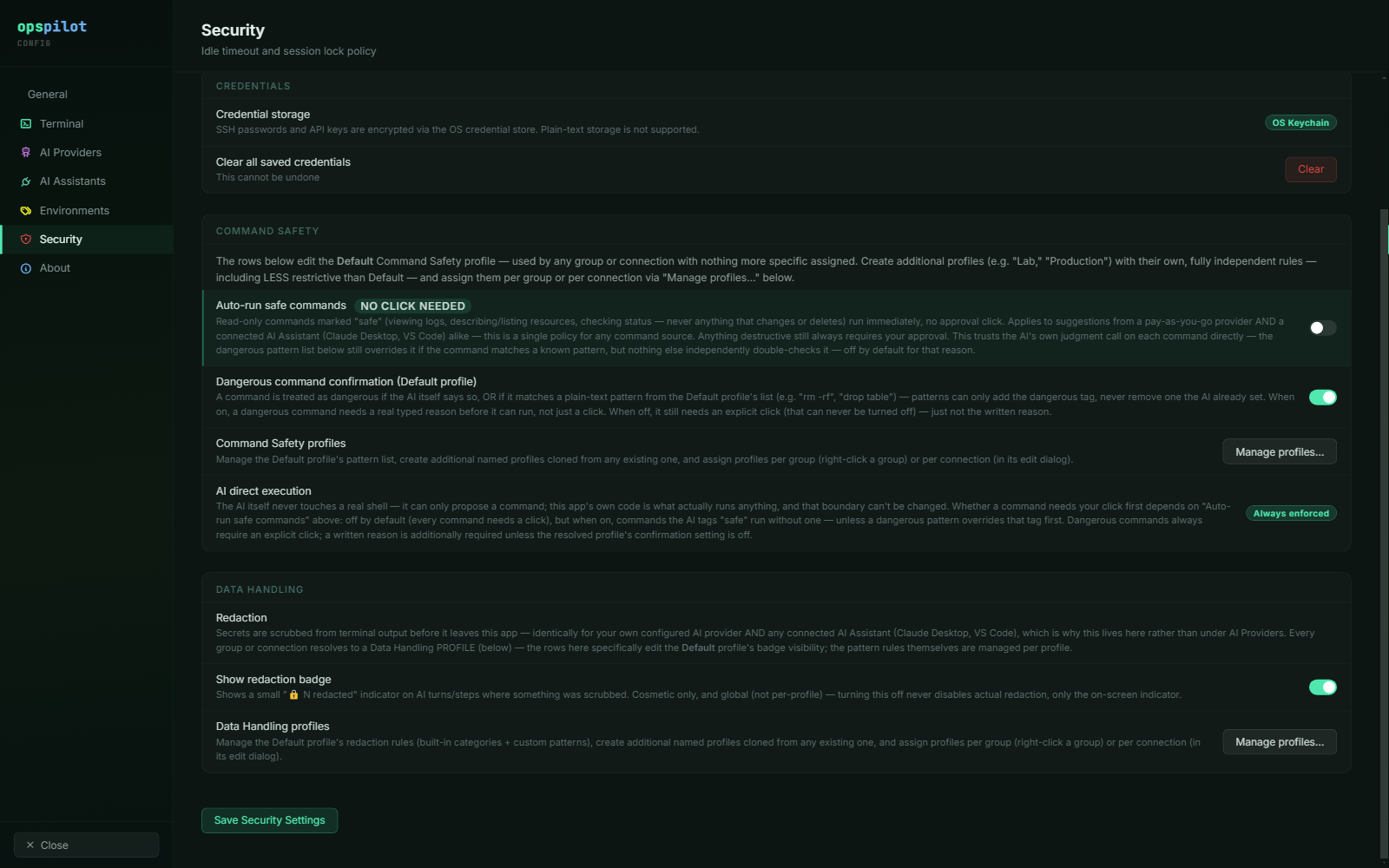
The Command Safety group on the Security page. The rows here edit the Default profile; Manage profiles… is where additional named profiles are created and assigned. Note that AI direct execution is reported as a permanent property of the application, not a toggle.
How a profile is chosen
Precedence is connection → group → Default:
- If the session's connection has a Command Safety profile assigned, that one applies.
- Otherwise, if the connection's group has one assigned, that one applies.
- Otherwise the Default profile applies.
The Default profile is seeded on first read with the 21 shipped dangerous patterns and confirmation on. It is fully editable, and it cannot be deleted — there must always be a resolvable fallback. A profile id that no longer exists, because someone deleted the profile a connection still referenced, is treated as unset and falls through the same chain to Default rather than failing.
Resolution is re-read per turn rather than captured when the session opened, so moving a connection into a different group changes the policy that applies to its open session too.
Profile assignment is SSH-only
Per-connection Command Safety and Data Handling assignment applies to SSH sessions. The AI path resolves sessions through the SSH session manager specifically, and the AI badge is not rendered for external launchers, file browsers, Telnet or RSH. A profile assigned to a Telnet or RSH connection therefore does nothing — not because it is permissive, but because no proposal can ever be made against that session. Scope your policy accordingly, and do not count a Telnet connection as covered.
Profile replacement
A profile does not add its patterns to Default's; it replaces Default entirely. A
Lab profile with two patterns and confirmation off is a complete policy, and it is
less restrictive than Default. That is deliberate: a group profile is a policy in its
own right, so a sandbox can be governed more loosely than the estate as a whole.
A permissive profile on a production group is a real exposure
Because profiles replace rather than extend, assigning Lab to a production group
silently removes every pattern in Default from every connection in that group. There
is no warning at assignment time and no merge to fall back on. Review profile
assignments as part of rollout, and re-review them whenever a connection moves
between groups. Hardening checklist has this as a standing item.
Plain substrings rather than regular expressions
Dangerous patterns are deliberately not regular expressions. Plain substrings are quicker to write and quicker to review, and a substring match cannot hang the interface or backtrack catastrophically.
The cost is precision. truncate matches any command containing the word, and chown -r
matches any recursive ownership change, not only the catastrophic ones. That trade is made
on purpose: over-matching costs you a typed justification, while under-matching costs you
an outage.
Custom redaction patterns are the opposite case — they are real regular expressions, because a redaction pattern has to describe a data format rather than a command fragment. Each of those is validated before it can be saved. See Data Handling profiles.
Building your list
The 21 shipped defaults already cover the obvious destructive commands — rm -rf,
mkfs, dd if=, drop table, shutdown, reboot, helm uninstall, iptables -F and
the rest. The full list is on
Default dangerous patterns.
Your work is therefore the tooling and the platform verbs specific to your estate, which no shipped default can guess.
A starting list of additions beyond the defaults
None of these ship in the Default profile. Add the ones that apply to your estate, and keep them in the profile that governs production.
terraform destroy
systemctl stop
systemctl disable
kubectl delete
oc delete project
openstack server delete
openstack volume delete
ceph osd rm
> /dev/sd
Notes on a few of them:
kubectl deleteis broader than the shippedkubectl delete namespaceandkubectl delete pv, and will flag routine pod deletions too. That is usually the right answer in production and the wrong answer in a lab — which is what separate profiles are for.systemctl stopcatches stopping any unit, including ones that are harmless to stop. Decide deliberately.- Add your own scheduler, storage and network-fabric verbs. A command that empties a switch configuration is not in any default list.
Review the finished list with whoever owns the estate, not only with whoever uses OpsPilot, and treat a change to the dangerous-pattern list as a reviewed change.
See also
- Default dangerous patterns — the 21 shipped entries
- Approvals & auto-run — what a High risk classification costs in practice
- Organising connections — groups, which is where a profile is usually assigned
- Hardening checklist — profile assignment as a pre-deployment gate