NubeStack OpsPilot
OpsPilot is a desktop operations workbench. It is a terminal, a file manager, a remote-desktop client and an AI assistant in one application, and it is built around a single idea:
The AI helps you operate your infrastructure. It never operates your infrastructure itself.
You connect to your servers, switches, storage and desktops the way you always have — SSH, RDP, VNC, FTP, S3, serial, or a local shell. OpsPilot watches the session with you. When you ask it a question, it reads the scrollback, strips the secrets out locally, sends only the sanitised text to the AI model you chose, and brings back an explanation plus a proposed command.
That command does not run. It appears in front of you, labelled with a risk tier, showing the exact text you are about to execute. You decide.
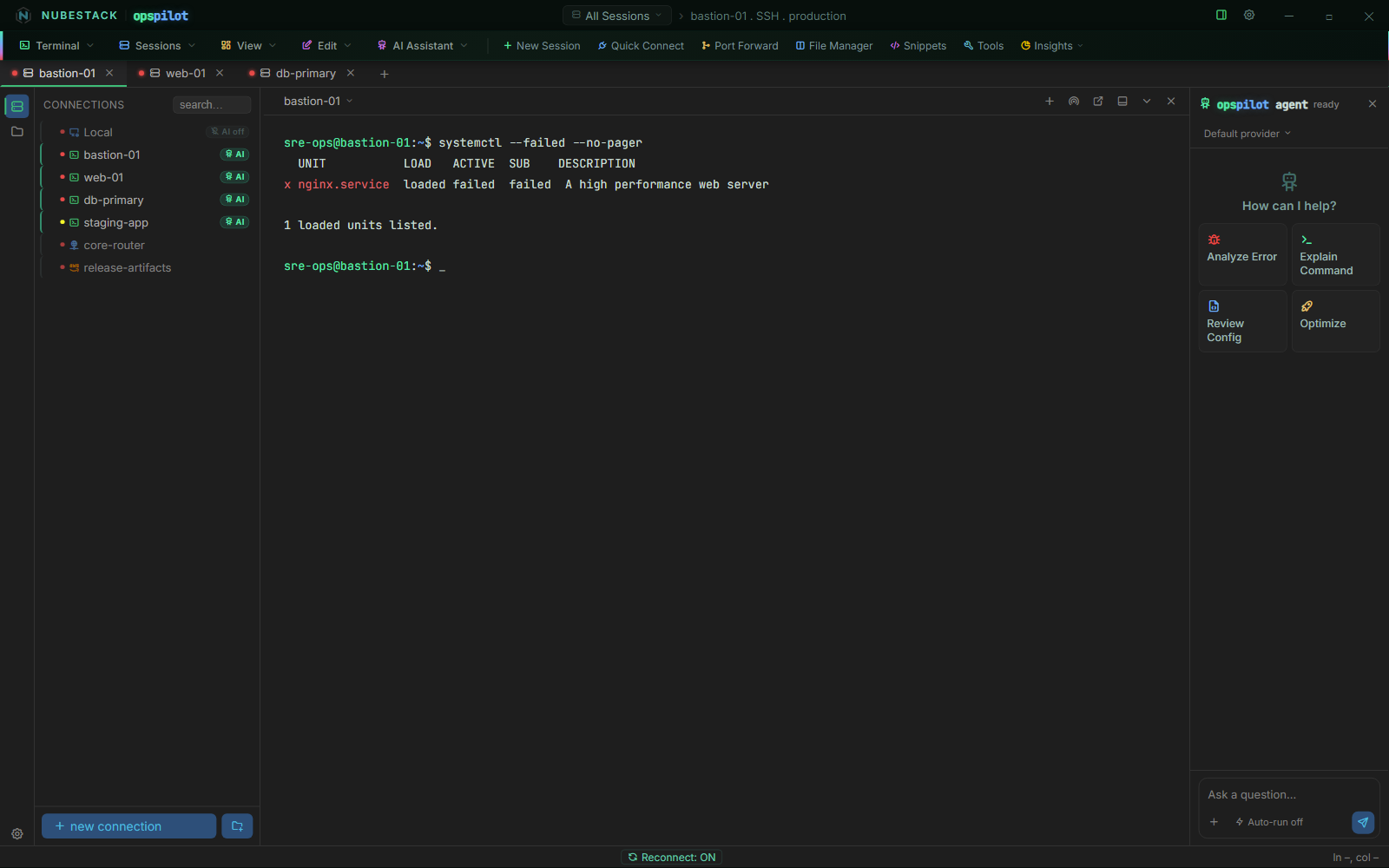
The OpsPilot workspace. Saved connections grouped by environment on the left, the live session in the centre, the AI panel on the right. The green AI badge marks which connections the assistant is allowed to see at all.
Start here
-
New to OpsPilot
What it is, why it exists and how the loop works.
-
Ready to install
Requirements, installers, first run, and a five-minute quickstart.
-
Connecting to things
Ten connection types, hypervisor consoles, groups and credentials.
-
Bringing your own AI
Ten providers, a fully offline option, or the subscription you already pay for.
-
Signing it off
The execution boundary, risk tiers, redaction and the security model.
-
Rolling it out
Role workflows, administration, upgrades and troubleshooting.
What makes it different
Most AI tooling assumes the machine you are working on can reach the internet, and assumes that giving the model a shell is the point. OpsPilot assumes the opposite on both counts.
Your servers can stay disconnected: only the workstation needs to reach the AI, and with a local model not even that. And the model is never given a shell — it can propose, it cannot execute. Together those two properties make OpsPilot usable in estates where AI assistance has not been an option: regulated banking, defence, healthcare, industrial control, classified networks, and production environments where a model running a command directly would not pass review.
Nothing is installed on the target hosts — no agent, no sidecar, no daemon and no outbound firewall rule. Any host you can already reach is a host OpsPilot can work against.
Private or VPN-only is not the same as air-gapped
With a cloud provider, your workstation still talks to the internet — that is private or VPN-only operation, and it is what most regulated teams actually need. For a genuinely air-gapped deployment, point OpsPilot at a local Ollama or self-hosted model and the loop closes entirely: nothing leaves the machine.
The safety model
- The AI never gets a shell. Proposals become commands only when you approve them. This is architectural, not a setting.
- Secrets are removed locally, before anything leaves the machine. Every route to a model redacts first.
- Your pattern list can only make things stricter. A pattern can promote a command to High risk; nothing can demote one the model already flagged.
See also
- What OpsPilot is — the longer answer
- Quickstart — first connection to first AI answer in about five minutes
- Execution boundary & risk tiers — read this before rolling OpsPilot out to a team
- Plans & subscription — the trial, and what it costs